Why The Free Chart Shows Ads, and How to Use It With an Ad Blocker
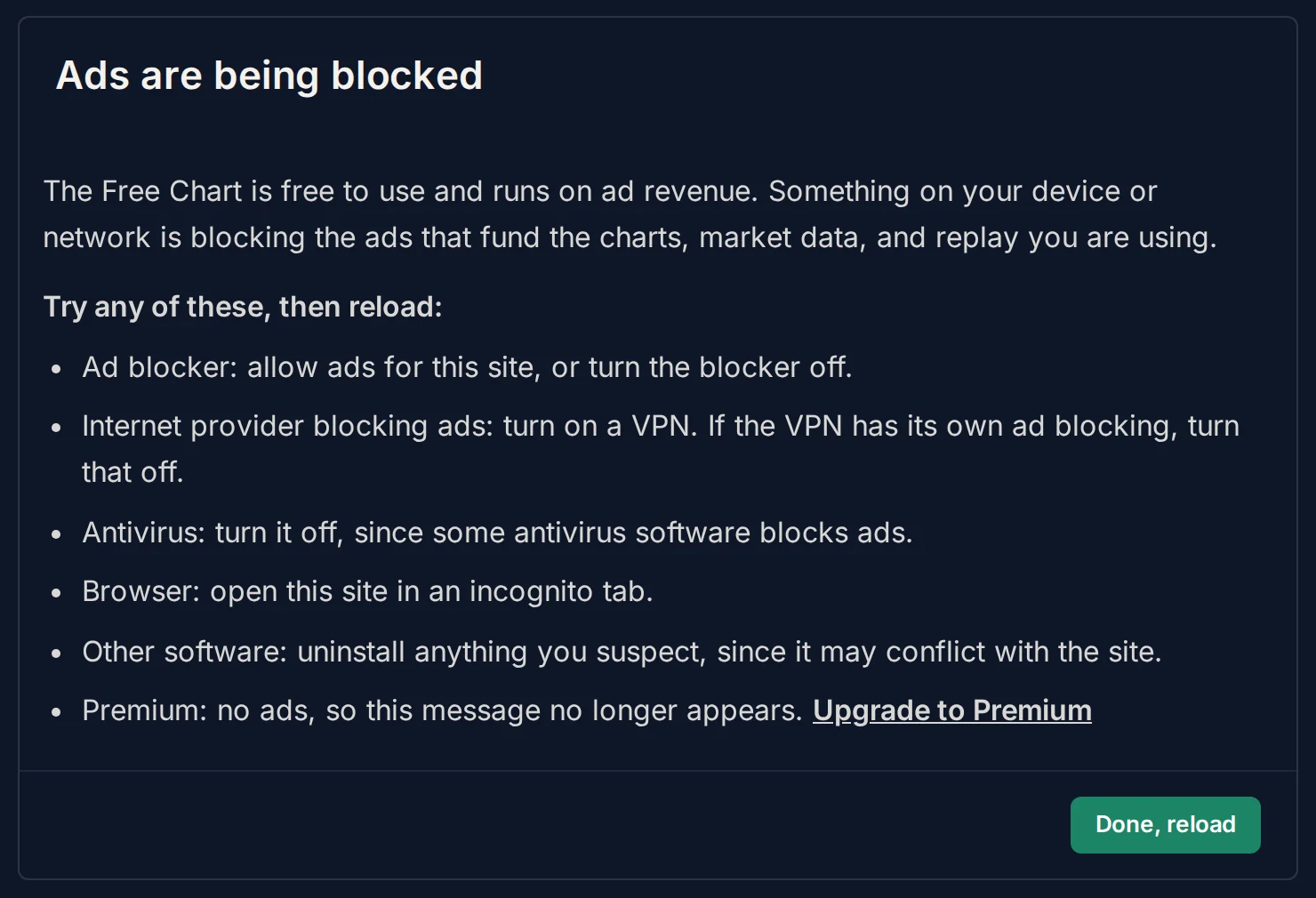
If you opened the chart and got a message saying "Ads are being blocked", this guide is for you. It explains why The Free Chart shows ads, and how to make the message go away so yo
The Free Chart is free because of ads. If you use an ad blocker, the chart shows a message saying "Ads are being blocked" and stops until the ads can load. This guide explains why the site needs ads, and how to keep your ad blocker for the rest of the web while The Free Chart works normally.
Why the site has ads
The Free Chart is free to use. You don't pay for the charts, the Trading Simulator or the journal. But running them is not free for us:
- Market data costs money every month. Prices for forex, gold, indices, crypto and stocks come from paid data providers.
- Servers store years of candles, run the replay, save your layouts and journal, and send your alerts all day.
- Building new features takes time and work.
Ads pay for all of this. When ads are blocked, the site keeps costing the same, but nothing pays for it. That is why the chart asks you to let the ads load.
You have two fair choices: allow ads on The Free Chart, or get Premium and see no ads at all.
When the message appears
- Only when you are signed in and using the chart.
- Only when the ads on the page really fail to load. If your ads load, you never see it.
- It waits about 2 minutes after the page loads, so the page has time to settle. If you turn on an ad blocker later, it can still appear while the chart is open.
- Premium members never see it.
"I don't have an ad blocker, why do I see this?"
We hear this a lot in the chat. The ads can be blocked by something that isn't called an "ad blocker":
- a VPN with an ad-blocking feature, or the network your VPN or internet provider uses (step 2),
- a DNS setting on your phone or router (step 2),
- your antivirus (step 3),
- an ad blocker built into your browser or your phone (steps 1 and 5),
- an extension that has nothing to do with ads (step 5).
The message tells you to try any of the fixes below, then click Done, reload. Here is each one in detail.
1. Ad blocker: allow ads for this site
This is the most common cause. You don't need to remove your ad blocker. Just allow ads on thefreechart.com and keep it on everywhere else.
Click the ad blocker's icon in the browser toolbar while you are on The Free Chart, then:
- uBlock Origin: click the big power button so it turns grey. This turns it off for this site only.
- AdBlock: choose Pause on this site (or Don't run on pages on this site).
- Adblock Plus: switch off Block ads on this website.
- AdGuard (extension): switch off protection for this website.
- Ghostery, Privacy Badger and similar privacy extensions can block ads too. Turn them off for this site.
Some browsers block ads by themselves, without any extension:
- Brave: click the lion icon in the address bar and turn Shields down for this site.
- Opera: click the shield icon in the address bar and turn off the ad blocker for this site.
- Firefox: if Enhanced Tracking Protection is set to Strict, click the shield icon in the address bar and turn protection off for this site.
- Edge: if Tracking prevention is set to Strict, set it to Balanced, or add thefreechart.com as an exception.
- Safari (Mac): Safari menu, Settings for thefreechart.com, uncheck Enable content blockers.
- Safari (iPhone, iPad): tap the aA button in the address bar, then Turn off Content Blockers.
Then click Done, reload.
2. Internet provider blocking ads: turn on a VPN
Sometimes the blocking is not on your device but on your network: your internet provider, an office, school or public Wi-Fi, or a home router that filters ads. You can't change those settings, but a VPN sends your traffic around them.
Turn on a VPN and reload the chart.
Careful: many VPNs have their own ad blocker, and that will trigger the same message. Turn that feature off. For example:
- NordVPN: Threat Protection
- Surfshark: CleanWeb
- Proton VPN: NetShield
Tips from our users in Iran. Several traders in Iran told us in the site chat that their VPN was the cause:
- One turned the VPN off, reloaded, and the message was gone.
- Others switched to Firefox's VPN and had no more problems.
- If your VPN is needed to reach the site, try another server or another VPN app, then reload.
On a phone, also check Private DNS (Android) or any DNS app or DNS profile you installed. Ad-blocking DNS services (such as AdGuard DNS or NextDNS with ad lists) block ads for every app. Set Private DNS back to Automatic, or turn the filtering off while you use the chart.
3. Antivirus: turn it off
Some antivirus and internet security programs include an ad or banner blocker, or a web filter that blocks ad networks. If you use one:
- Look for a setting called something like Anti-Banner, Ad blocking, or Web protection, and turn it off or add thefreechart.com as an exception.
- If you can't find it, turn the antivirus off for a moment and reload. If the message disappears, the antivirus was the cause. Turn it back on and look for the exception setting.
4. Browser: open the site in an incognito tab
Most browsers turn extensions off in incognito or private windows. That makes this the fastest way to check whether an extension is the problem.
- Chrome, Edge: Ctrl+Shift+N (Cmd+Shift+N on Mac)
- Firefox: Ctrl+Shift+P (Cmd+Shift+P on Mac)
- Safari: Cmd+Shift+N
Sign in again in the new window and open the chart. If the message doesn't appear there, one of your extensions is blocking the ads: go back to step 1 and allow ads for this site in that extension.
Incognito does not help if the blocking comes from your network, a VPN, DNS or antivirus (steps 2 and 3).
5. Other software: remove what conflicts with the site
If none of the above worked, something else on your device is still blocking ads. Common causes:
- System-wide ad blockers, such as the AdGuard app for Windows, Mac or Android. These work outside the browser, so the browser looks clean.
- Extensions you forgot about: "privacy", "security", "shopping" or "cleaner" extensions often block ads as a side effect. One of our users found that a screen-recording extension was the cause.
- Phone settings: some phones have an ad blocker in the system settings or in the built-in browser. Look for "Ad blocker" or "Block ads" in your phone's settings and browser settings.
To find it: turn off all your browser extensions, reload the chart, then turn them back on one by one. When the message comes back, you've found it. Allow ads on thefreechart.com in it, or uninstall it if you don't need it.
6. Premium: no ads, no message
If you'd rather not see ads at all, Premium removes every ad from the site, so this message never appears, whatever ad blocker you use. It also supports the site directly.
Still seeing the message?
- There can be more than one blocker at the same time, for example an extension and a DNS filter. Fix one, reload, and check the next.
- Always click Done, reload (or press F5) after a change. The site only checks again after the page reloads.
- Try a different browser with no extensions. If it works there, the problem is in your usual browser.
- Still stuck? Email [email protected] with your browser, your device, and what you've tried.
Thank you for allowing the ads. They are what keeps The Free Chart free for everyone.
No comments yet. Login to start a new discussion Start a new discussion